
Redesigning Your Website Without Losing Google Rankings: A Step-by-Step Plan
Most rankings lost in a redesign are lost the same way: URLs change, content disappears and nobody sets up redirects. Here's a step-by-step plan to redesign safely.

To redesign a website without losing Google rankings, keep every page that brings traffic, map each old URL to its new one, set up permanent (301) redirects on launch day, keep the content and on-page SEO that made those pages rank, and watch Search Console closely for the following weeks. Most ranking losses after a redesign come from URLs that changed without redirects, or content that was cut. Google expects some temporary fluctuation during a move, but a well-planned redesign usually settles.
Key takeaways
- Before you change anything, record which pages bring traffic and links.
- Map every old URL to the most relevant new URL and use server-side 301 or 308 redirects.
- Google recommends keeping redirects for at least a year.
- Don't strip content, titles or internal links from pages that rank.
Why do redesigns lose rankings?
The same few mistakes, over and over:
- URLs change and nobody redirects them. Old URLs return 404 errors, and the links and rankings those pages had are lost.
- Everything is redirected to the homepage. Google treats that much like a missing page.
- Content is cut to make the design look cleaner, and with it the words that matched people's searches.
- Titles, headings and meta descriptions are rewritten or lost.
- The staging site's "noindex" setting goes live, telling Google to drop every page.
- Internal links are lost, especially from navigation and footers.
- The new site is slower because of heavier design and scripts.
None of these are about design. They're all about process.
The redesign plan, step by step
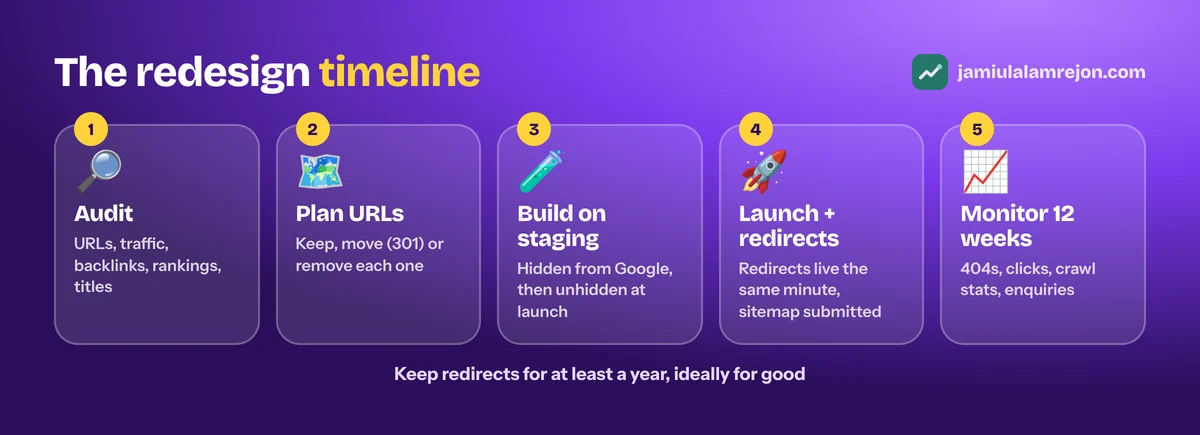
Step 1: Audit what you have now
Before anyone opens a design tool, record:
- Every URL on the site. A crawler such as Screaming Frog, or your current sitemap, will list them.
- Which pages get traffic. Google Search Console (Performance → Pages) for search clicks, plus Google Analytics for all traffic.
- Which pages have backlinks. Search Console's Links report shows the top linked pages.
- Current rankings for your most important searches.
- Titles, meta descriptions and H1s of your top pages.
Save all of it. It's your baseline and your checklist.
Step 2: Decide what happens to every URL
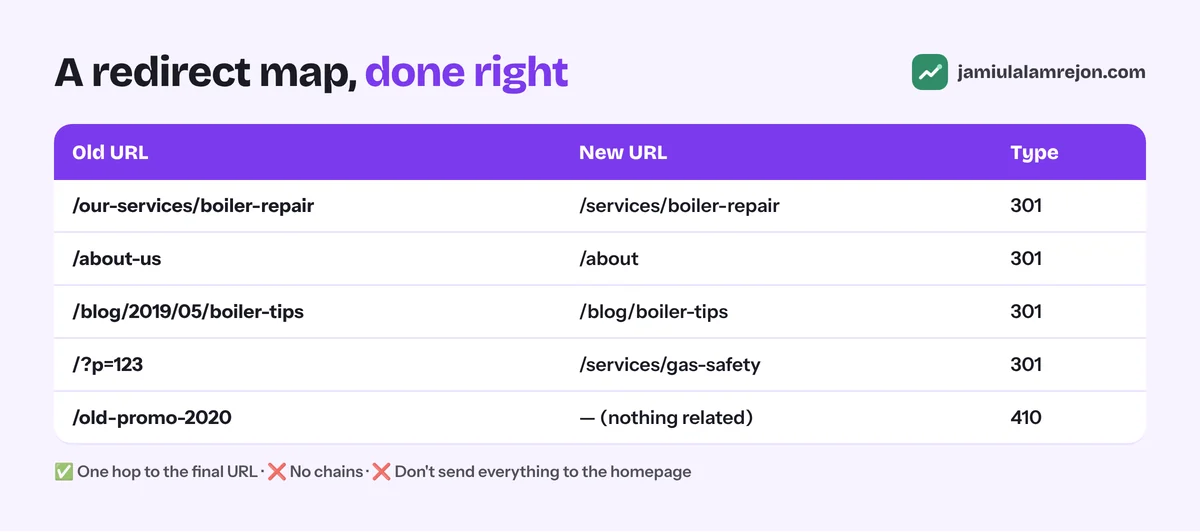
Each old URL gets one of three outcomes:
- Keep the same URL. The best option when you can. No redirect needed.
- Move to a new URL. Redirect the old URL to the new one with a 301.
- Remove the page. If there's a closely related page, redirect to it. If there's genuinely nothing related, let it return 404 or 410.
Write it all in a spreadsheet: old URL, new URL, status. That's your redirect map.
Step 3: Keep what makes your pages rank
For pages that bring traffic, carry over the main content, the keywords people found you with (from Search Console), the title, the H1 and the internal links pointing to them. You can improve the writing and layout. Don't strip it down.
Step 4: Build on a staging site, hidden from Google
Build the new site on a staging address protected by a password, or set to noindex. Then, before launch, check that the protection is removed from the live site. Leaving noindex on is one of the most common and most damaging launch mistakes.
Step 5: Test before launch
- Every redirect in your map works and goes straight to the final URL. Google advises avoiding redirect chains.
- Titles, meta descriptions and H1s are in place on key pages.
- The new sitemap lists only new, live URLs.
- Canonical tags point to the right URLs.
- Forms, phone links and tracking all work.
- The site passes Core Web Vitals, or at least isn't slower than the old one. See Core Web Vitals explained.
Step 6: Launch with redirects live
Turn on the redirects at the same moment the new site goes live. Google's site move guide recommends server-side permanent redirects (301 or 308), updating internal links and canonical tags to the new URLs, and submitting your updated sitemap in Search Console.
If you're also changing your domain name, use Search Console's Change of Address tool. Google notes you only need it for moves between domains or subdomains, not for HTTP to HTTPS or www changes.
Step 7: Monitor for at least 12 weeks
Google says to "expect temporary fluctuation in site ranking during the move." Watch:
- Search Console → Pages for new 404s and "Page with redirect" counts.
- Search Console → Performance for clicks and impressions compared with your baseline.
- Crawl stats, to check Google is crawling the new URLs.
- Your enquiries and sales. Rankings are only useful if they bring business.
Fix any 404s that should have been redirected straight away.
Step 8: Keep the redirects
Google recommends keeping redirects "for as long as possible, generally at least 1 year." In practice, I leave them in place permanently. They cost almost nothing and protect links from other sites.
What about moving from WordPress to a new platform?
The same plan applies, with two extras: export all content including images and alt text, and check that any URL patterns WordPress created (categories, tags, dates in URLs, ?p=123 links) are covered in the redirect map. I do this regularly when moving clients from WordPress to Next.js.
How do you set up redirects?
It depends on your server and platform. A few common examples:
Apache (.htaccess):
Redirect 301 /our-services/boiler-repair /services/boiler-repair
Redirect 301 /about-us /about
Nginx:
location = /our-services/boiler-repair { return 301 /services/boiler-repair; }
location = /about-us { return 301 /about; }
Next.js (next.config.js):
async redirects() {
  return [
    { source: "/our-services/boiler-repair", destination: "/services/boiler-repair", permanent: true },
    { source: "/about-us", destination: "/about", permanent: true },
  ];
}
WordPress: a redirection plugin lets you add them from the admin, and many SEO plugins include a redirect manager.
Whatever you use, test a sample of redirects after launch with a browser in private mode, or a redirect checker, to confirm each one returns a 301 or 308 and lands on the right page in a single hop.
What should you do if rankings drop after launch?
Don't panic in the first few days. Google needs time to recrawl. But don't wait months either. Work through this list:
- Check for noindex. View the source of a few key pages and search for "noindex". Also check robots.txt isn't blocking the site.
- Check your top old URLs. Take the 20 old URLs that had the most traffic and test each one. Any that 404 or redirect to the homepage need fixing.
- Compare page by page. In Search Console, compare clicks for your top pages before and after. Where one dropped sharply, compare the old and new content, title and headings.
- Check internal links. Are important pages still linked from the menu and from other pages?
- Check speed. A much slower new site can lose ground.
- Request indexing for your most important new URLs in Search Console's URL Inspection tool.
Most drops trace back to one of the first three.
Should you redesign and change domain at the same time?
It's safer not to. Each change on its own is manageable. Together, if something goes wrong, it's hard to tell which change caused it. If you must do both, plan the redirects very carefully and use Search Console's Change of Address tool for the domain move.
Frequently asked questions
Will I lose rankings after a redesign?
Some short-term fluctuation is normal. With redirects, content and on-page SEO preserved, most sites recover within weeks, and often improve if the new site is faster and clearer.
Should I use 301 or 302 redirects?
Use permanent redirects, 301 or 308, for a redesign. A 302 tells search engines the move is temporary.
Can I change all my URLs to make them cleaner?
You can, but every changed URL needs a redirect and carries some risk. Only change URLs where the benefit is real.
How long should I keep redirects?
Google says at least a year. Keeping them permanently is safer, especially for pages with links from other websites.
What's the biggest single risk?
Launching without redirects, or with the staging site's noindex setting still on. Both can wipe out search traffic within days.
Planning a redesign?
I handle redesigns and migrations with the redirect map, testing and monitoring included. See my website migration service or get in touch.