AI Chatbot for Your Business Website: What It Does, What It Costs, How to Set It Up
An AI chatbot can answer customer questions and capture leads around the clock. Here's what it can and can't do, how pricing works, and how to set one up without upsetting customers.

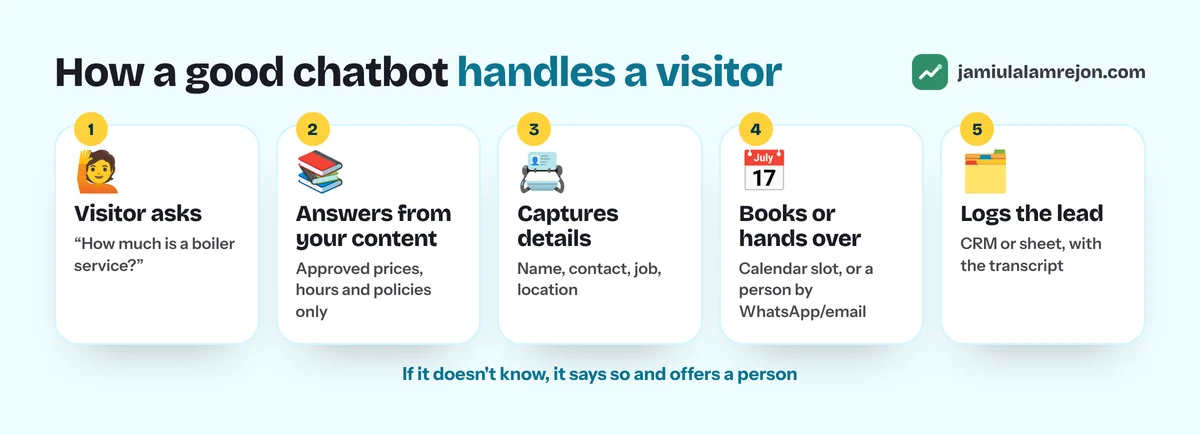
An AI chatbot on a business website answers visitors' questions in plain language, around the clock, using your own content: services, prices, hours, policies. Good ones also capture contact details, book appointments and hand the conversation to a person when needed. Costs range from a monthly subscription on a chat platform, to a per-conversation fee for AI agents, to a custom build that you pay for once plus usage. A chatbot is only as good as the information you give it, so the setup work matters more than the tool.
Key takeaways
- A chatbot should answer from your own approved content, and say when it doesn't know.
- The value is in instant answers out of hours, and in capturing leads you'd otherwise miss.
- Pricing models: monthly platform fee, per-resolution fee (Intercom's Fin is $0.99 per outcome), or custom build plus AI usage.
- Always give people an easy route to a human.
What can an AI chatbot do for a small business?
- Answer common questions instantly. Prices, opening hours, areas covered, what's included, how to prepare.
- Capture leads out of hours. Someone browsing at 11 pm can leave their details and the details of their job instead of leaving the site.
- Qualify enquiries. Ask the questions you'd ask on the phone (location, job type, timeline) and pass a complete summary to you.
- Book appointments by connecting to your calendar or booking system.
- Hand over to a human by email, WhatsApp or live chat when a question is unusual or the customer asks.
What can't it do (yet)?
- Know things you haven't told it. If your prices aren't in its knowledge, it shouldn't guess. Set it up to say "I'll get someone to confirm that."
- Replace judgement on complex or sensitive cases. Complaints, medical or legal questions, and big quotes need a person.
- Fix a weak offer or a slow website. It helps people who are already interested.
The biggest risk is a chatbot that sounds confident and is wrong. Tight setup, a limited knowledge source and clear rules about when to hand over prevent most of that.
How much does an AI chatbot cost?
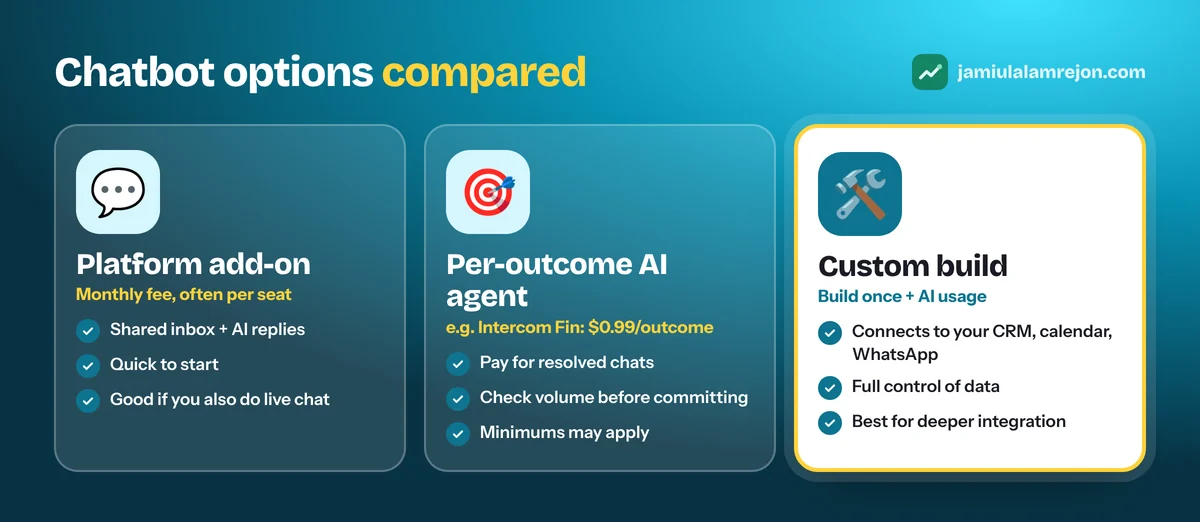
There are three common pricing models:
- Chat platform with an AI add-on. You pay a monthly fee for the chat tool, sometimes per seat, with AI replies included or charged extra. Good if you also want a shared inbox for live chat.
- AI agent priced per outcome. For example, Intercom charges $0.99 per outcome for its Fin AI agent, with a monthly minimum when used with another helpdesk, according to a June 2026 pricing breakdown by Featurebase. That source is a competitor of Intercom, so check Intercom's own pricing page before budgeting.
- Custom-built chatbot. Built on an AI model's API and connected to your website, CRM and calendar. You pay for the build, then for usage of the AI model, which for a small business's chat volume is often small. Best when you need it to work closely with your own systems, or want full control over the data.
Whichever you pick, estimate your monthly conversations first. Per-conversation pricing that looks cheap can add up on a busy site, and a flat monthly fee can be wasted on a quiet one.
How do you set up an AI chatbot, step by step?
1. Decide its jobs
Pick two or three, for example: answer pricing and service questions, capture leads after hours, book consultations. A bot with a clear job does it better.
2. Write its knowledge source
Collect your service pages, prices or price ranges, areas covered, policies, and the answers to the questions customers ask most. If it's not written down, the bot can't use it. This step usually improves your website too.
3. Set the rules
- Answer only from the approved knowledge.
- If unsure, say so and offer a person.
- Never promise prices, dates or outcomes that aren't in the knowledge.
- Collect name and phone or email before handing over.
- Stay polite and short.
4. Connect it to where leads go
Every captured lead should land somewhere you'll see it: your CRM, a Google Sheet, an email, a WhatsApp message. See lead follow-up automation for how to make sure each one gets a fast reply.
5. Test with real questions
Ask it the twenty questions you hear most, plus a few awkward ones. Check that the answers are right, that it hands over when it should, and that leads arrive.
6. Launch, then read the conversations
Read the transcripts weekly for the first month. Every wrong or "I don't know" answer is a gap to fill in the knowledge source.
Privacy and trust
- Tell people they're chatting with an AI assistant. It's honest, and people are more forgiving of a bot that says what it is.
- Mention the chatbot in your privacy policy, including which provider processes the conversations.
- Don't let it ask for sensitive data such as card details or medical information.
- Check where data is stored if you serve customers in the UK or EU and need to meet GDPR requirements.
What does a good knowledge source look like?
The knowledge source is the written material the chatbot answers from. For a small business, a single well-organised document often works better than pointing the bot at the whole website.
A simple structure:
- About the business: what you do, areas covered, opening hours, contact details.
- Services: for each one, what's included, price or price range, how long it takes, who it's for, who it's not for.
- Booking: how to book, lead times, deposits, cancellation policy.
- Common questions: each question as a heading, with a short, direct answer.
- Things the bot must not do: give medical or legal advice, confirm prices that aren't listed, promise dates.
- Handover: when to pass to a person, and how.
Write it in plain language, the way you'd explain it to a new member of staff. Update it whenever prices, services or policies change.
An example conversation
Here's how a well-set-up chatbot for a fictional dental clinic might handle an out-of-hours visitor:
Visitor: Do you do teeth whitening and how much is it? Bot: Yes, we offer home whitening kits fitted by our dentists. The full treatment costs £350, including a check-up first to make sure whitening is suitable for you. Would you like to book a consultation? Visitor: Is it painful? Bot: Some people have temporary sensitivity during treatment. The dentist will talk you through it at the consultation. I can't give medical advice here, but I can book you in or ask the team to call you. Visitor: Ask them to call me. Bot: Of course. What's your name and the best number to reach you? The clinic opens at 8:30 tomorrow.
The bot answered from its knowledge, avoided giving medical advice, and captured the lead with a clear next step.
Questions to ask a chatbot provider
Before you sign up for a platform or hire someone to build one, ask:
- Where does the bot get its answers, and can I limit it to my approved content?
- What happens when it doesn't know the answer?
- How does it hand over to a person, and where do leads go?
- How is it priced: per seat, per conversation, per resolution, or usage? What would my likely volume cost?
- Where is conversation data stored, and is it used to train anyone's models?
- Can I read every conversation?
- How easy is it to update the knowledge?
- Can it connect to my CRM, calendar and WhatsApp?
Frequently asked questions
Will an AI chatbot annoy my customers?
Bad ones do. A chatbot that answers accurately, admits when it doesn't know, and makes it easy to reach a person usually helps, especially out of hours.
Can the chatbot book appointments?
Yes, if it's connected to your booking system or calendar. Most platforms and custom builds support this.
Does a chatbot help SEO?
Not directly. But writing its knowledge source often reveals questions your website doesn't answer, and adding those answers helps search and AI visibility.
What's better, live chat or an AI chatbot?
If someone can reliably answer live chat within a minute or two, live chat is great. If not, an AI chatbot that answers instantly and hands over the tricky cases usually serves customers better.
How long does setup take?
A basic chatbot on a platform can be live in a day. A well-set-up one, with a written knowledge source, rules, integrations and testing, usually takes one to two weeks.
Want a chatbot that actually helps?
I build AI chatbots and automations connected to your website, CRM and WhatsApp, set up to answer from your content and hand over cleanly. See my AI automation service or get in touch.