
InvoPress – Free Invoice Plugin for WooCommerce
InvoPress turns every WooCommerce order into a branded PDF invoice. Design it once in a live preview, and the plugin numbers each invoice, attaches it to your order emails and gives your customers a download button.
What is InvoPress?
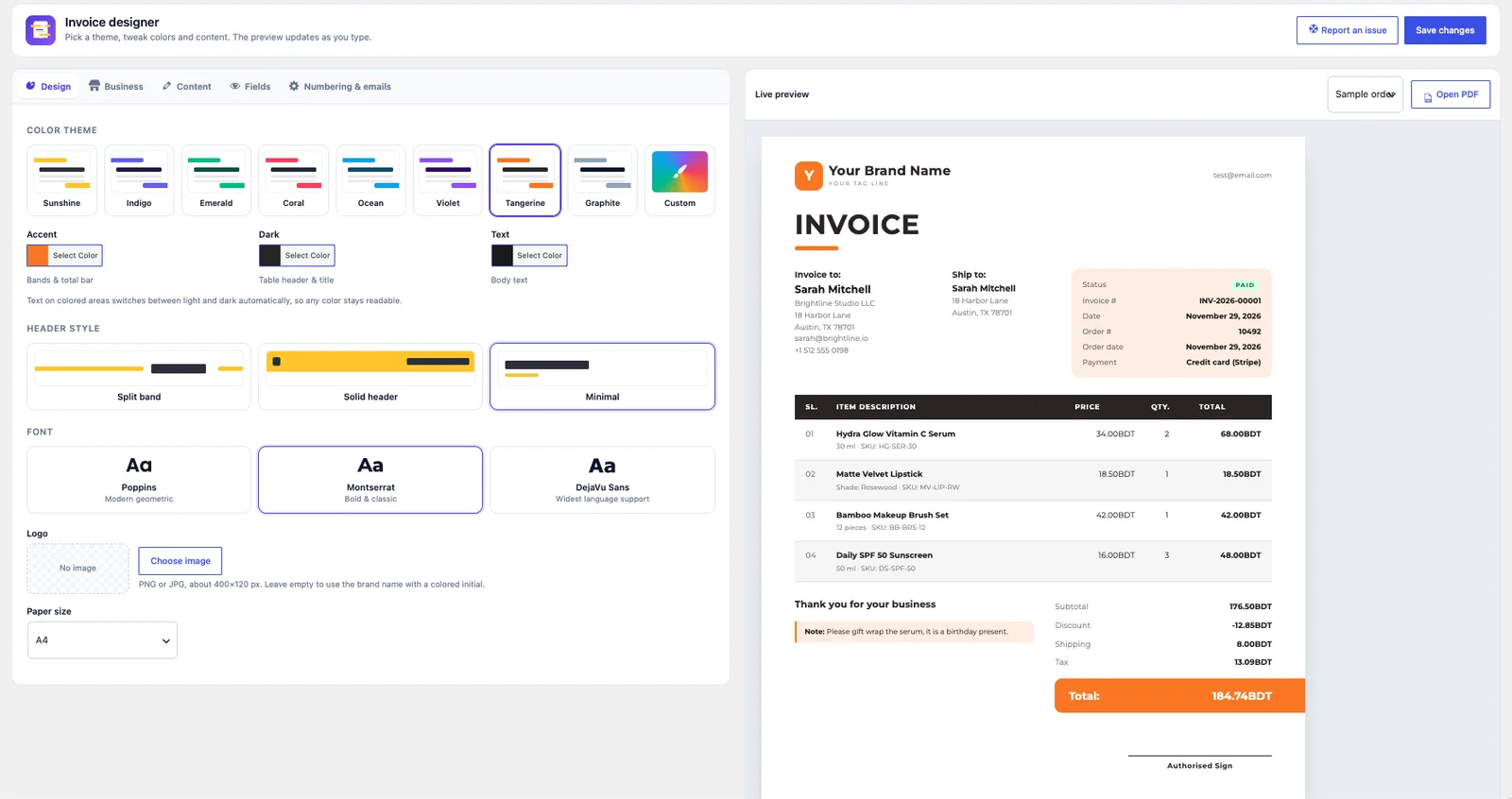
InvoPress is a free WordPress plugin that creates PDF invoices for WooCommerce orders. You design the invoice once in a live preview with your logo, colors and business details. After that, InvoPress gives every order a sequential invoice number, attaches the PDF to the WooCommerce emails you pick and adds a download button to your customer's account. The PDFs are made on your own server, and nothing is sent to an outside service.
See InvoPress in action
What InvoPress can do
Live invoice designer
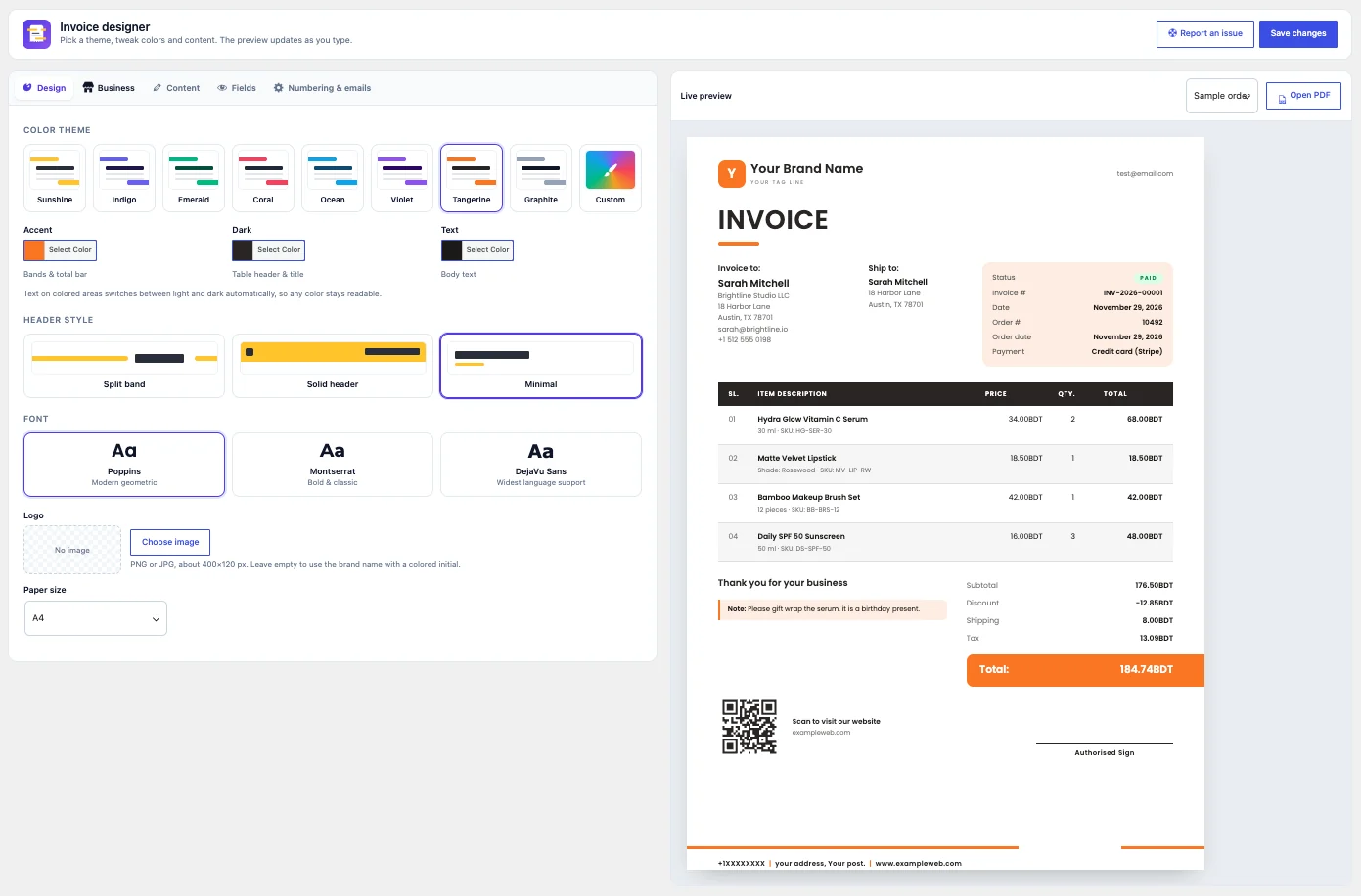
Change colors, header style, font, logo and text, and the invoice preview updates as you type.
8 color themes or your own
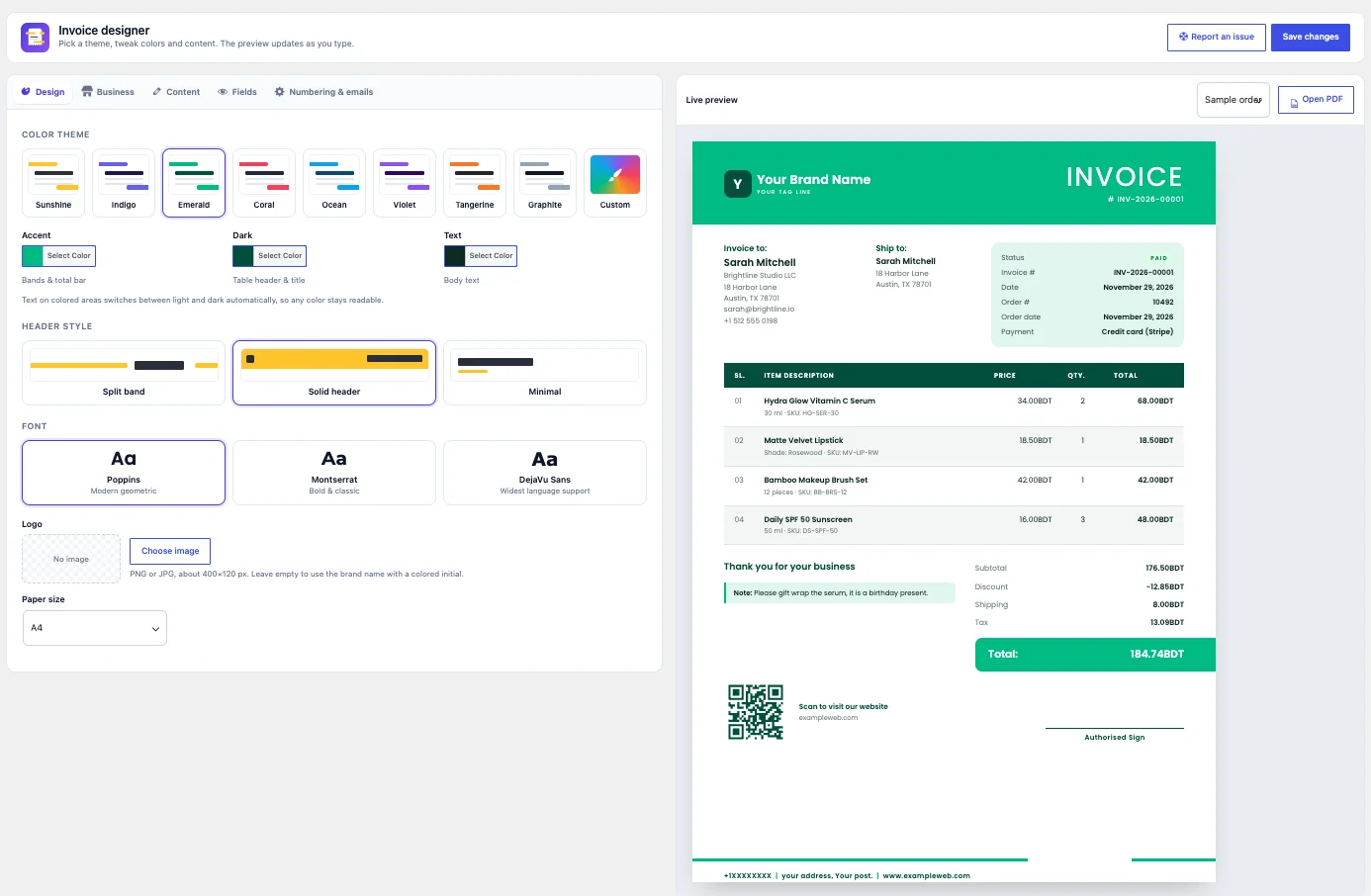
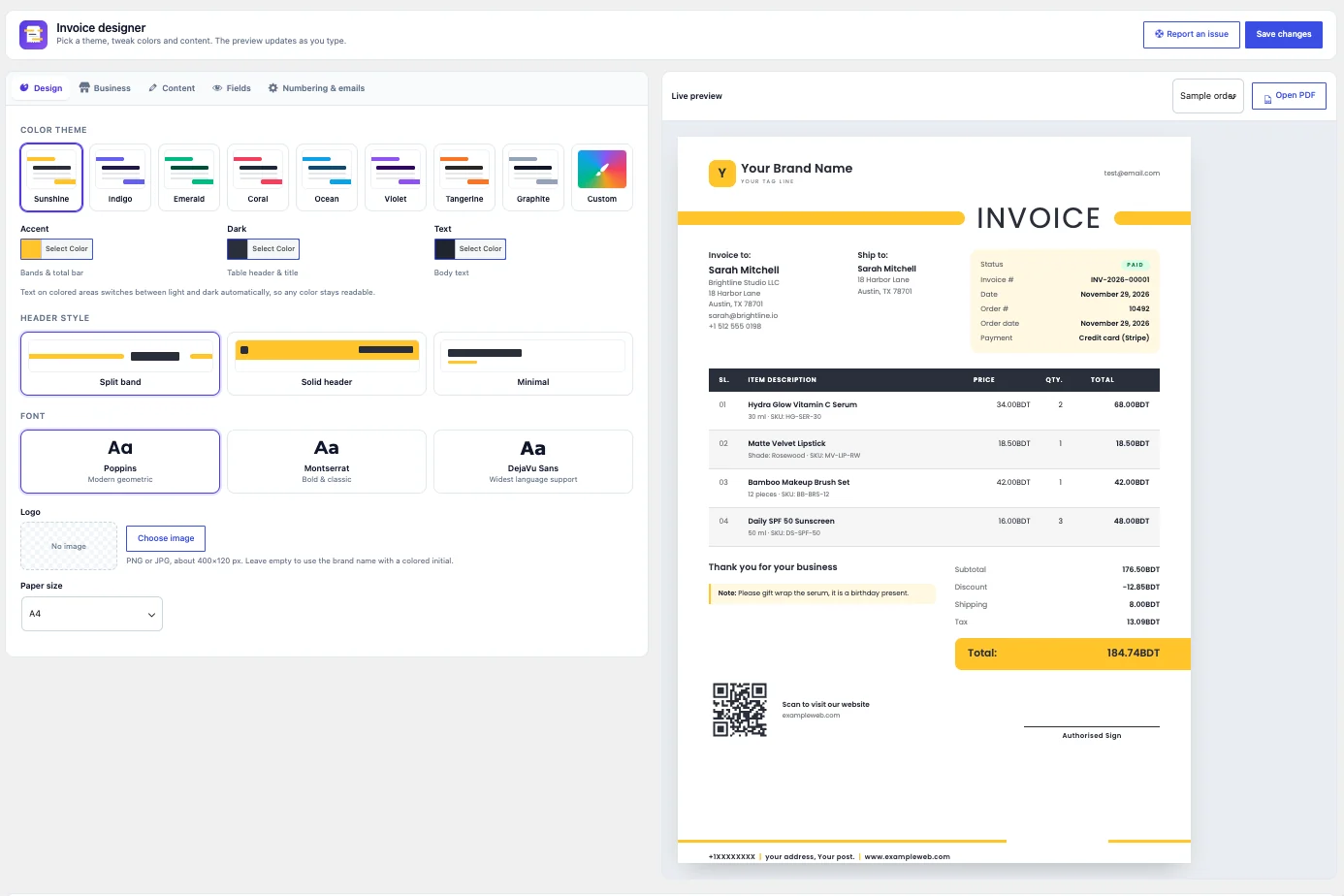
Sunshine, Indigo, Emerald, Coral, Ocean, Violet, Tangerine, Graphite or any custom color. Text on colored areas switches between light and dark, so it stays readable.
3 header styles, 3 fonts
Split band, Solid header or Minimal, with Poppins, Montserrat or DejaVu Sans. A4 or US Letter paper.
QR code on the invoice
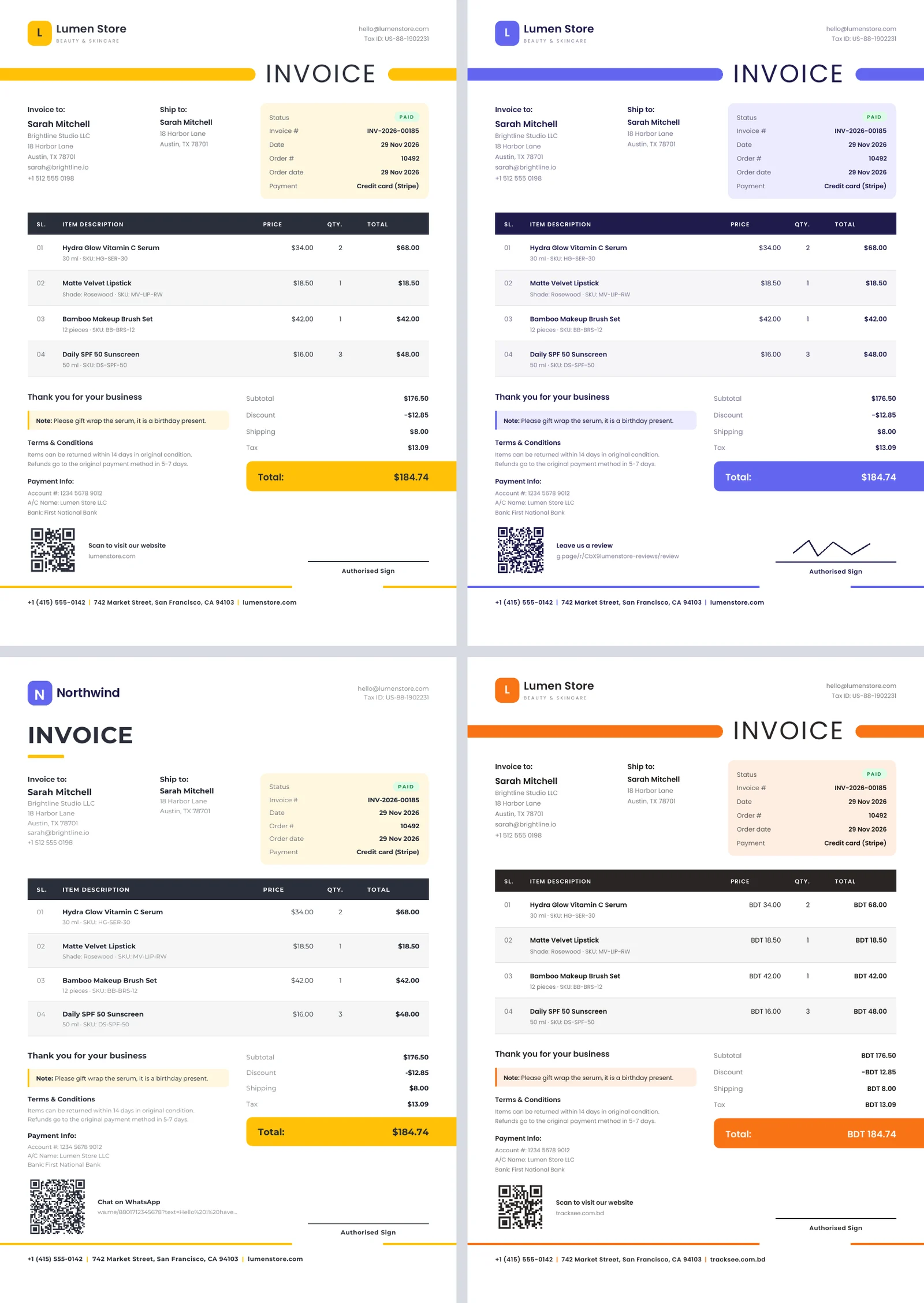
Link it to your website or any link, such as a Google review page or a WhatsApp chat. The code is made on your server.
Invoice numbers that never repeat
Sequential, gap-free numbers with your own prefix, suffix, digit count and date tokens, like INV-2026-00001.
Invoices sent automatically
Choose which order statuses create an invoice and which WooCommerce emails carry the PDF.
Downloads for you and your customers
Invoice box on the order screen, bulk download from the Orders list, and a download button in My Account, the order page and the thank-you page.
Works with modern WooCommerce
Compatible with High-Performance Order Storage (HPOS) and the Cart & Checkout blocks.
Private by design
No external service, no tracking, and no credit link added to your invoices or your store.
How to set up InvoPress in 4 steps
- 01
Install the zip
In WordPress, go to Plugins → Add New → Upload Plugin, choose the InvoPress zip and activate it. WooCommerce needs to be active.
- 02
Add your business
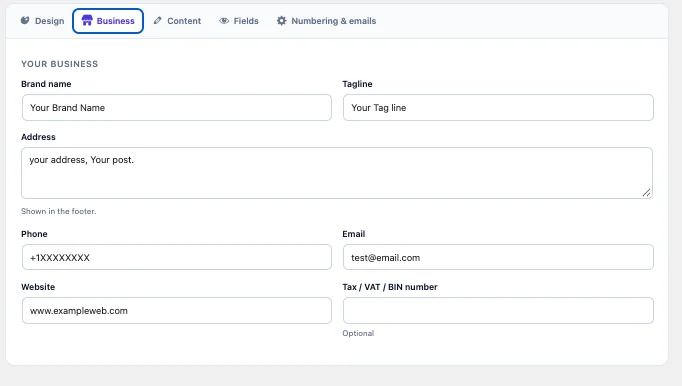
Open WooCommerce → Invoices and fill in the Business tab: brand name, logo, address, phone, email, website and tax number.
- 03
Design the invoice
Pick a color theme, header style and font, then choose which fields show. The live preview updates as you go.
- 04
Choose when it's sent
In Numbering & emails, set your invoice number format, the order statuses that create an invoice and the emails that carry the PDF.
Why a WooCommerce store needs an invoice plugin
WooCommerce records orders, but it doesn't create PDF invoices on its own. Customers still ask for them: businesses need one for their accounts, and many shoppers want a proper document for a large purchase. Copying order details into a Word file by hand is slow, and it's easy to get a price or an address wrong.
InvoPress takes that job over. Once your invoice is set up, every order that reaches a status you choose gets a numbered PDF invoice, and the PDF goes out with your WooCommerce emails.
Design an invoice that looks like your brand
The settings page shows a live preview of a real invoice next to the controls, so you see every change straight away.
- Colors: choose one of 8 themes (Sunshine, Indigo, Emerald, Coral, Ocean, Violet, Tangerine and Graphite) or set your own accent, dark and text colors. Text on colored areas switches between light and dark automatically, so any color you pick stays readable.
- Header: Split band, Solid header or Minimal.
- Font: Poppins, Montserrat, or DejaVu Sans for the widest language support.
- Your details: logo, business name, tagline, address, phone, email, website and tax, VAT or BIN number.
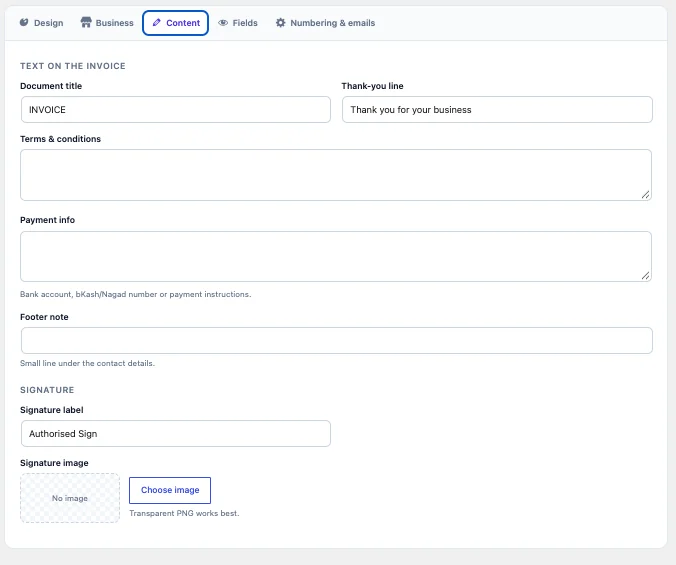
- Your text: the document title, a thank-you line, terms and conditions, payment instructions (a bank account, or a bKash or Nagad number), a footer note and a signature image.
- Paper: A4 or US Letter.
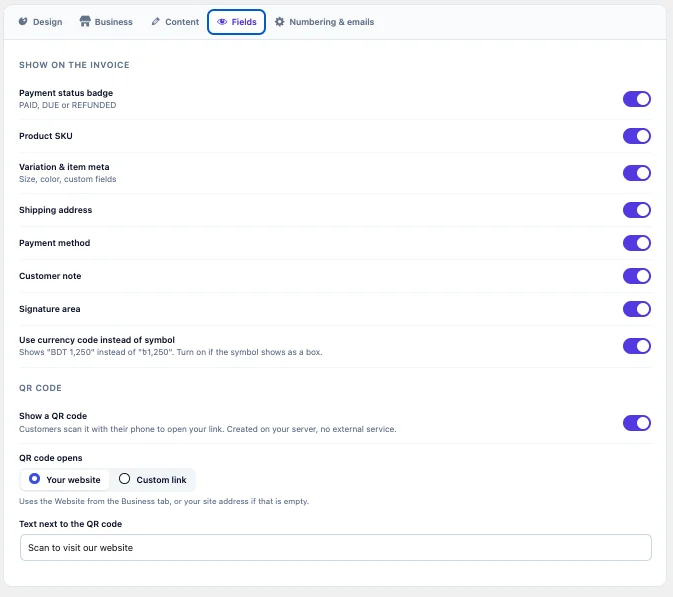
You also decide what appears on the invoice: the PAID, DUE or REFUNDED badge, product SKUs, variation and item meta, the shipping address, the payment method, the customer's note and the signature area.
Invoice numbers that never repeat
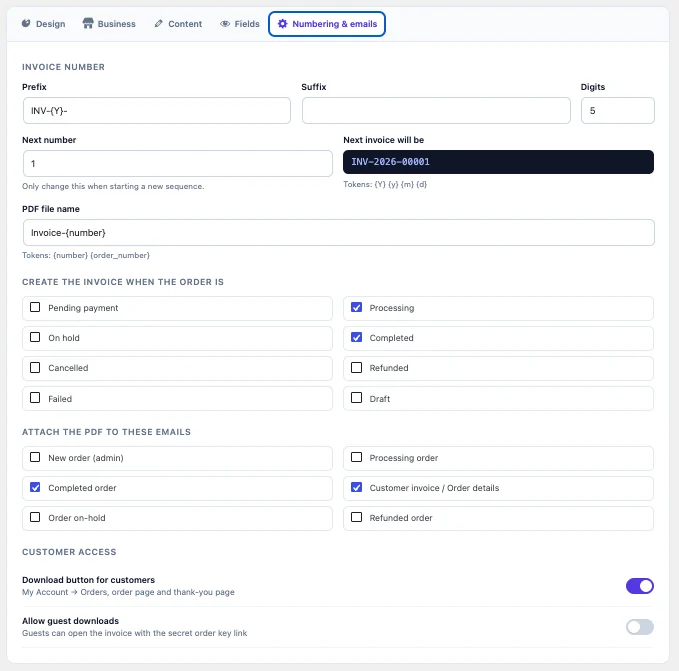
InvoPress numbers invoices in order, without gaps, and never reuses a number. You set the format in the "Numbering & emails" tab:
| Setting | Example |
|---|---|
| Prefix with date tokens | INV-{Y}- |
| Digits | 5 |
| Next invoice will be | INV-2026-00001 |
The tokens are {Y} (four-digit year), {y} (two-digit year), {m} (month) and {d} (day). You can also set a suffix and the starting number, which is useful when you move from another invoicing system. The PDF file name follows your own pattern too, such as Invoice-{number}.
Send invoices automatically
You choose which order statuses create an invoice. Processing and Completed are selected by default, and you can add Pending payment, On hold, Cancelled, Refunded, Failed or Draft.
You also choose which WooCommerce emails carry the PDF: New order (admin), Processing order, Completed order, Customer invoice / Order details, Order on-hold and Refunded order. To send one invoice by hand, use "Email invoice to customer" in the order actions dropdown.
What you and your customers see
On the order screen there's an invoice box, and the Orders list has an invoice button for each order plus a bulk "Download invoices (PDF)" action.
Customers get a download button in My Account, on the order page and on the thank-you page. If you want guests to download theirs as well, turn on guest download links. They're protected by the order's secret key.
Add a QR code to your invoices
Version 1.2.0 can print a QR code at the bottom of the invoice, across from the signature. It can open:
- your website, using the Website from the Business tab, or your site address if that's empty, or
- any custom link, such as your Google review page, Facebook page or a WhatsApp chat.
You can edit the caption next to it, for example "Scan to visit our website" or "Leave us a review", and turn the code off at any time. The code is generated by InvoPress itself on your server; no outside QR service is used. Short links, such as a g.page or wa.me link, make codes that are the easiest to scan.
Private by design
PDFs are made on your own server with the Dompdf library that comes with the plugin. InvoPress doesn't contact any external service, doesn't track anything and doesn't add a credit or link to your invoices or your shop. That matters if you sell in regions with strict privacy rules: your customers' order data stays on your server.
Currency and language support
If the ৳ (Taka) or another currency symbol shows as a box in the PDF, turn on "Use currency code instead of symbol" in the Fields tab, and the invoice shows "BDT 1,250" instead. This option is on by default for BDT, PKR, LKR and NPR.
Labels can be translated. Text in Latin, Cyrillic and Greek scripts works with every font. The PDF engine can't yet shape complex scripts such as Bangla, Arabic or Devanagari correctly, so keep invoice text in a Latin script for now.
Requirements
| WordPress | 6.6 or newer (tested up to 7.1) |
| WooCommerce | 9.0 or newer (tested up to 11.2) |
| PHP | 7.4 or newer |
| License | GPLv2 or later |
For developers
To change the layout, copy templates/invoice.php to yourtheme/invopress/invoice.php and edit the copy.
Filters: invopress_template_data, invopress_item_data, invopress_invoice_number, invopress_template_path, invopress_qr_url, invopress_dompdf_options, invopress_attach_to_email, invopress_auto_create and invopress_attachable_emails.
Actions: invopress_invoice_created and invopress_after_invoice.
InvoPress or invoices made by hand?
| Invoices made by hand | InvoPress | |
|---|---|---|
| Time per order | Copy each order into a document | None after setup |
| Invoice numbers | Easy to skip or repeat one | Sequential and never reused |
| Sending | Attach each file to an email | Attached to the emails you pick |
| Customer copy | Sent on request | Download button in My Account |
| Branding | Depends on the template | Your logo, colors and fonts on every invoice |
| Cost | Your time | Free |
Who makes InvoPress?
InvoPress is built and maintained by Jamiul Alam Rejon, a web developer and digital growth strategist who builds WooCommerce and Next.js stores. If you find a bug or need help, send a message.
InvoPress questions
Is InvoPress free?
Yes. InvoPress is free to download and use on your WooCommerce store, and it's licensed under GPLv2 or later.
Where do I find the InvoPress settings?
In your WordPress admin, go to WooCommerce → Invoices.
When is an invoice number created?
When an order reaches one of the statuses you select (Processing and Completed by default), when you open the invoice from the order screen, or when the PDF is attached to an email. Numbers are never reused.
Can I change the starting invoice number?
Yes, in the "Numbering & emails" tab. Change it only when you start a new sequence.
The ৳ (Taka) or another currency symbol shows as a box. How do I fix it?
Turn on "Use currency code instead of symbol" in the Fields tab. It is on by default for BDT, PKR, LKR and NPR.
Can the invoice be in Bangla, Arabic or Hindi?
Labels can be translated, and text in Latin, Cyrillic and Greek scripts works with every font. The PDF engine can't yet shape complex scripts such as Bangla, Arabic or Devanagari correctly.
Where does the QR code link to?
To the Website from the Business tab (or your site address if that's empty), or to any custom link you enter in the Fields tab. You can turn it off there. The code is created on your server; no external QR service is used.
Can customers download their own invoices?
Yes. They get a download button in My Account, on the order page and on the thank-you page. Guest downloads are optional and protected by the order's secret key.
Does InvoPress work with HPOS and the checkout blocks?
Yes. It's compatible with WooCommerce High-Performance Order Storage (HPOS) and the Cart & Checkout blocks.
Does InvoPress add a credit link to my invoices?
No. Nothing is added to your invoices or your store front.
How do I report a problem?
Send a message through the contact form on jamiulalamrejon.com, or use the "Report an issue" link in the plugin's admin page.
What's new in InvoPress
1.2.0· 2026-11-29
- New: QR code on the invoice that opens your website or a custom link, with its own caption. Built-in generator, no external service.
- New: Developer credit and "Report an issue" links in the admin.
- Improved: Security and coding-standards hardening for WordPress.org.
1.0.0· 2026-11-28
- First release.
Get InvoPress 1.2.0
Free download · needs WordPress 6.6+, WooCommerce 9.0+, PHP 7.4+